Skip to content
  • Home
  • System Requirements
  • Compatible Products
  • Knowledge Base
  • User Manual
  • Download
  • About
  • Contact
Tilt 4 Windows 2
  • Home
  • System Requirements
  • About
  • Contact

Installation

1
  • Installation

Configuration

6
  • Initial Setup (User & Main Configuration)
  • Adding Tilt(s) to T4W
  • Configure Your Tilt(s)
  • Configure your Text & Email information for notifications
  • Configure Heating & Cooling Devices (Smart Plugs)
  • Configure T4W’s Color Theme

Sessions

6
  • Starting a new Tilt session
  • Configure Session
  • Google Sheets (Automated)
  • Edit Session Information
  • Marking A Session As Completed
  • Past Sessions & My Brewing Log
  • Home
  • Docs
  • Configuration
  • Configure T4W’s Color Theme
View Categories

Configure T4W’s Color Theme

< 1 min read

0:00 / 0:44
  • View as Markdown Open this page as plain Markdown (opens in a new tab)
  • Open in ChatGPT Ask questions about this page (opens in a new tab)
  • Open in Claude Ask questions about this page (opens in a new tab)
  • Open in Google AI Studio Ask questions about this page (Google account required) (opens in a new tab)

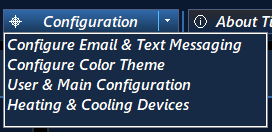
To change T4W’s Color Theme click on the Configuration Tab located along the top of the Dashboard and then click the Configure Color Theme menu option.
The Color Theme window will be shown which will look like this.
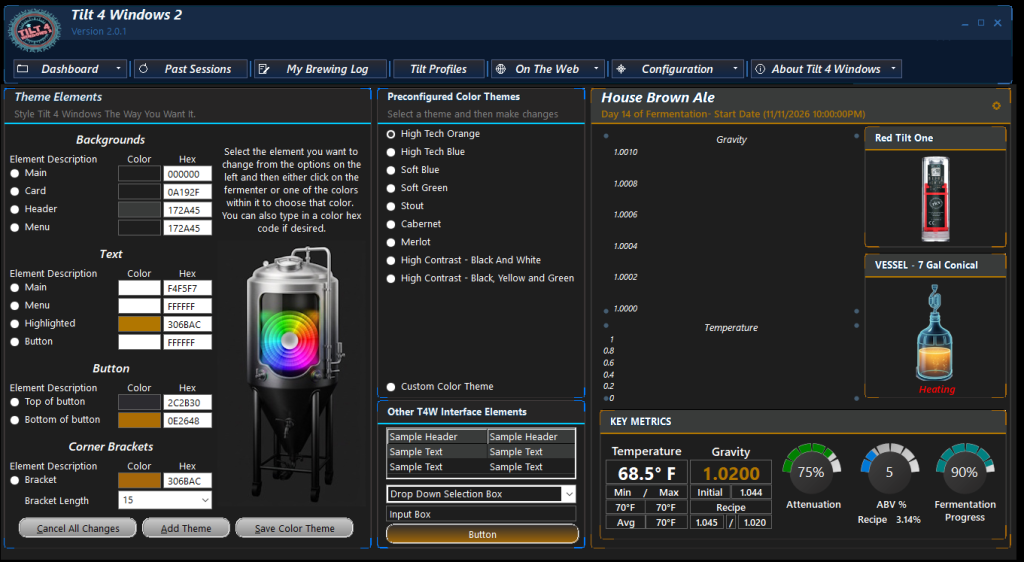
Customizing Your Theme & Colors:
Personalize the look of Tilt 4 Windows 2 by choosing a Preconfigured Color Theme or designing your own color scheme.

  1. Select a preset from the Preconfigured Color Themes, or create a custom one.
  2. To change a specific color, click an item in the Theme Elements area.
  3. Choose your new color from the color picker, or type a custom Hex value directly into the field.
  4. Preview your design in the real-time preview panel on the right side of the window.
  5. Click Save Color Theme to apply your changes.
Updated on October 14, 2026
Configure Heating & Cooling Devices (Smart Plugs)Initial Setup (User & Main Configuration)
  • Home
  • System Requirements
  • Compatible Products
  • Knowledge Base
  • User Manual
  • Download
  • About
  • Contact

Copyright © 2026 Tilt 4 Windows 2